API · v1
API Reference
Users, bulk sync, history, schema, prompts, and webhooks.
Coding agents, refer to: llms.txt
Overview
TeamSquared is based on a flexible, spreadsheet-like data model. The API exposes the data schema (columns), views (sheets), and users (rows in the sheet, each one a user of AI), plus other system resources.
Bearer tokens are granted permission scopes and bound to a view.
Base URL
https://api.teamsquared.ai/api/v1
Version
Current: 1.0.0 (path: /v1). Breaking changes bump the path segment; non-breaking changes bump semver. See the changelog.
curl https://api.teamsquared.ai/api/v1/users \
  -H "Authorization: Bearer ext_agent_REPLACE_ME"
curl
Authentication
Bearer token in the Authorization header. Tokens are 64 chars prefixed ext_agent_.
Create a token
- Log in to app.teamsquared.ai.
- Open Settings → API Tokens.
- Click New token, name it, pick the scopes and bound view, then create.
- Copy the full token immediately — see the warning below.
ext_agent_REPLACE_ME below is a placeholder.Authorization: Bearer ext_agent_REPLACE_MEheader
Scopes
Tokens carry one or more case-sensitive resource:permission scopes that gate which endpoints they can call. Scopes are picked in the UI when the token is created (Settings → API Tokens → New token) and can't be changed afterward — issue a new token to widen or narrow access. Missing scope → 403.
| Scope | Grants | v1 endpoints |
|---|---|---|
| users:read | Read users. | GET /users |
| users:write | Create/update users, bulk upsert. | POST /users, POST /users/batch, PUT /users/by-recipient/:recipientId, PATCH /users/:userId |
| users:delete | Hard-delete users. Not implied by users:write. | DELETE /users/:userId |
| user_history:read | Read per-user history and chat transcripts. | GET /users/:userId/history, GET /users/:userId/chat-messages |
| user_history:write | Append and import history. | POST /users/:userId/history, POST /history/batch |
| schema:read | Read schema metadata. | GET /user_schema |
| schema:write | Create/update schema fields. | POST /user_schema, PATCH /user_schema/:fieldName |
| prompts:read | Resolve active prompts. | POST /prompts/resolve |
| prompts:write | Reserved. | No v1 endpoint yet. |
| webhooks:read | List webhook subscriptions. | GET /webhooks, GET /webhooks/:id |
| webhooks:write | Create, update, delete, test subscriptions. | POST /webhooks, PATCH /webhooks/:id, DELETE /webhooks/:id, POST /webhooks/:id/test |
{
  "error": "Forbidden",
  "message": "Missing required scope: users:write"
}
403 responseUsers
Each row in the spreadsheet, whether it's a lead, contact, customer, invoice, ticket, etc is (or represents) a unique user of the AI system. A continuous history record is stored for each user.
In TeamSquared, almost everything is a user. A "user" row can represent any of:
- Live — a real production user of the AI system.
- Sandbox — a synthetic user created for experimentation and prompt iteration.
- Discussion — an example user that anchors a discussion, ticket, or escalation thread.
- Eval — an example user used as a training or evaluation case.
- Rated — a snapshot captured from a thumbs-up / thumbs-down rating.
This unified shape lets the platform freely clone, replay, and transport conversations between modes for AI improvement: a live conversation can be cloned into a sandbox to iterate on a fix, promoted into an eval to lock in expected behavior, or anchored into a discussion to track an escalation.
User type is exposed as userType on every record. Tokens (and webhooks) can opt into the user types they care about — see Events & user types.
Data model & views
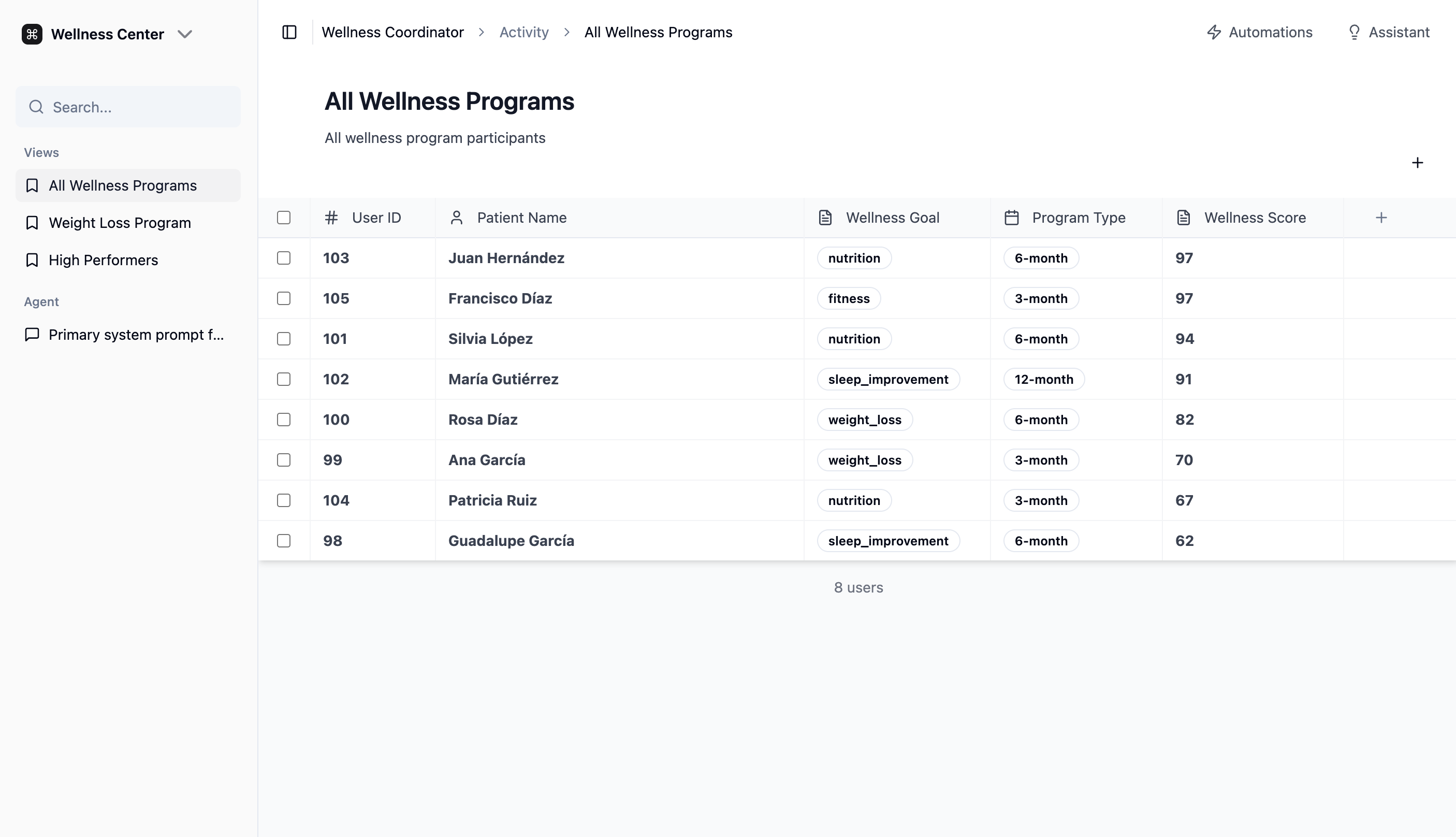
Similar to a spreadsheet, the data model is flexible. Views (shown in the left sidebar of the dashboard below) define a filtered subset of users with limited data for a specific purpose. Every API token is bound to a view; the view determines which fields are returned on reads and which fields callers can filter or sort by.
What reads return
- Always returned —
id,recipientId,externalId,createdAt,lastResponseAt,lastUpdatedAt,archivedAt,doNotContact. - View fields — the view's curated list.
- Reserved fields — never returned, regardless of view.
schema:write token can edit any field definition under the agent.curl "https://api.teamsquared.ai/api/v1/users?sortBy=wellness_score&sortOrder=desc" \ -H "Authorization: Bearer ext_agent_REPLACE_ME"curl · list users in view
Assuming the Bearer token is bound to the view shown.
// View exposes: name, wellness_goal, program_type, wellness_score
{
  "users": [
    {
      "id": 103,
      "recipientId": "+15125550103",
      "externalId": "crm_88213",
      "createdAt": "2025-09-14T08:12:04.118Z",
      "lastResponseAt": "2026-04-29T17:05:22.901Z",
      "lastUpdatedAt": "2026-04-30T11:18:43.220Z",
      "archivedAt": null,
      "doNotContact": false,
      "name": "Juan Hernández",
      "wellness_goal": "nutrition",
      "program_type": "6-month",
      "wellness_score": 97
    },
    // ...7 more users
  ],
  "totalCount": 8,
  "pagination": {
    "limit": 50,
    "offset": 0,
    "hasMore": false,
    "nextCursor": null
  }
}
200 responseDetecting changes
lastUpdatedAt bumps on every write that changes the row. Three patterns:
- Webhooks — subscribe to
user.updated; each delivery names thechangedFieldsand carries the projected user. See Webhooks. - Incremental sync —
?updatedSince=<iso>&sortBy=lastUpdatedAt&sortOrder=asc, followpagination.nextCursoruntilnull. Subtract 60 s from your watermark each run to catch in-flight writes. - Full audit —
sortBy=id&sortOrder=asc&limit=200, follownextCursor. Every user in the view appears exactly once.
lastUpdatedAt or fires events.Code example — ERP sync (Node, ~60 lines)
Mirrors users + chat history into a stand-in ERP. Initial offset-paged load, then a single ?updatedSince= catch-up. Read-only token.
const TOKEN = process.env.TOKEN;
const API = 'https://api.teamsquared.ai/api/v1';
const sleep = (ms) => new Promise((r) => setTimeout(r, ms));

// Stand-in for the ERP's own table. The ERP — not the API —
// owns the record of when it last saved each user.
const erp = {
  records: new Map(),
  save(u) {
    this.records.set(u.id, {
      recipientId: u.recipientId,
      name: u.name ?? null,
      savedLastUpdatedAt: u.lastUpdatedAt,
    });
  },
  newestSavedAt() {
    return [...this.records.values()]
      .map((r) => r.savedLastUpdatedAt).sort().at(-1);
  },
};

async function initialSync() {
  const limit = 20;
  let offset = 0;
  while (true) {
    const url = new URL(`${API}/users`);
    url.searchParams.set('limit', String(limit));
    url.searchParams.set('offset', String(offset));
    const res = await fetch(url, { headers: { Authorization: `Bearer ${TOKEN}` } });
    const { users, pagination } = await res.json();

    for (const u of users) {
      erp.save(u);
      const mres = await fetch(`${API}/users/${u.id}/chat-messages?limit=100`,
        { headers: { Authorization: `Bearer ${TOKEN}` } });
      const { messages } = await mres.json();
      console.log(JSON.stringify({ user: u, chatMessages: messages }, null, 2));
      await sleep(1000); // stay under 60 req/min
    }

    if (!pagination.hasMore) break;
    offset += limit;
    await sleep(1000);
  }
}

// In production, fired by a webhook subscription on user.updated:
// the ERP exposes an HTTP handler, the API POSTs the change, and
// the handler calls periodicSync(). Polling is a fallback.
async function periodicSync() {
  const since = erp.newestSavedAt();
  const url = new URL(`${API}/users`);
  url.searchParams.set('updatedSince', since);
  url.searchParams.set('limit', '200');
  const res = await fetch(url, { headers: { Authorization: `Bearer ${TOKEN}` } });
  const { users } = await res.json();
  const changed = [];
  for (const u of users) {
    const existing = erp.records.get(u.id);
    if (existing && existing.savedLastUpdatedAt === u.lastUpdatedAt) continue;
    erp.save(u);
    changed.push(u);
  }
  console.log(JSON.stringify({ changed }, null, 2));
}

await initialSync();
await periodicSync();sync-poc.mjscurl --get "https://api.teamsquared.ai/api/v1/users" \ --data-urlencode "updatedSince=2026-05-01T00:00:00Z" \ --data-urlencode "sortBy=lastUpdatedAt" \ --data-urlencode "sortOrder=asc" \ --data-urlencode "limit=200" \ -H "Authorization: Bearer ext_agent_REPLACE_ME" # Then: ...&cursor=curl · incremental syncuntil nextCursor is null.
Rate limiting
Fixed-window, per-token, not per-IP. Two independent counters:
| Counter | Default | Applies to |
|---|---|---|
| default | 60 req/min | Every endpoint except the batch endpoints |
| batch | 20 req/min | POST /users/batch, POST /history/batch (up to 1,000 items each) |
Every response carries X-RateLimit-Limit, X-RateLimit-Remaining and X-RateLimit-Reset (Unix seconds). On exceed: 429 with Retry-After. Please honor it. Higher limits for a token are available on request.
HTTP/1.1 429 Too Many Requests
Retry-After: 47
X-RateLimit-Limit: 60
X-RateLimit-Remaining: 0
X-RateLimit-Reset: 1788480047
Content-Type: application/json

{
  "error": "Too Many Requests",
  "message": "Rate limit exceeded: 60 req/min"
}
429 responseIdempotency
Send an Idempotency-Key header (≤128 chars, unique per token) on POST /users, POST /users/batch, POST /history/batch, PUT /users/by-recipient/:recipientId and DELETE /users/:userId. A retry with the same key and body returns the stored response with Idempotent-Replayed: true instead of running again. Keys expire after 24 hours.
- 409
idempotency_in_progress— the first request is still running. - 422
idempotency_key_reused— same key, different body. - Responses of 5xx are not stored; retry freely.
curl -X POST "https://api.teamsquared.ai/api/v1/users/batch" \
  -H "Authorization: Bearer ext_agent_REPLACE_ME" \
  -H "Idempotency-Key: sync-2026-09-03T14:00Z-page-7" \
  -H "Content-Type: application/json" \
  -d @page-7.json
# Same key + same body again → identical response, Idempotent-Replayed: true
curl
Errors
| Status | Meaning | Triggered by |
|---|---|---|
| 200 | OK | Read or update succeeded |
| 201 | Created | Resource created |
| 400 | Bad Request | Missing fields, bad params, filter/sort outside view |
| 401 | Unauthorized | Missing or invalid token |
| 403 | Forbidden | Missing scope |
| 404 | Not Found | Resource doesn't exist |
| 409 | Conflict | Duplicate recipientId (recipient_conflict) or externalId (external_id_conflict); idempotent request in progress |
| 422 | Unprocessable | Idempotency-Key reused with a different body |
| 429 | Too Many Requests | Rate limit — see Rate limiting |
| 500 | Internal Server Error | Server error |
JSON body with error, often message and a machine-readable code, plus context (recipientId, fieldName, …).
{
  "error": "User not found",
  "recipientId": "+1234567890"
}
404 response{
"error": "Bad Request",
"message": "Filter field not in view: selected_office"
}400 responseMCP server alpha
The same API is available as an MCP server, so an AI agent (Claude Code, Claude Desktop, Cursor, or your own) can work with users, history and schema through tools instead of hand-written HTTP calls.
Streamable HTTP transport, stateless: every request carries the bearer token, there are no sessions, and GET answers 405. The token's scopes and bound view apply exactly as they do on the REST endpoints, including the by-id boundary described under Data model & views.
Tools
| Tool | Scope | REST equivalent |
|---|---|---|
| list_users | users:read | GET /users |
| create_user | users:write | POST /users |
| update_user | users:write | PATCH /users/:userId |
| upsert_user_by_recipient | users:write | PUT /users/by-recipient/:recipientId |
| upsert_users_batch | users:write | POST /users/batch |
| delete_user | users:delete | DELETE /users/:userId |
| get_history | user_history:read | GET /users/:userId/history |
| add_history | user_history:write | POST /users/:userId/history |
| import_history_batch | user_history:write | POST /history/batch |
| get_chat_messages | user_history:read | GET /users/:userId/chat-messages |
| get_schema | schema:read | GET /user_schema |
| create_schema_field | schema:write | POST /user_schema |
| update_schema_field | schema:write | PATCH /user_schema/:field |
Tool results are the same JSON bodies the REST endpoints return. A failed call comes back as a tool error carrying the REST error body ({ error, code, message }), so an agent can read code and decide what to do.
default bucket, including the initialize and tools/list handshake; the two batch tools count toward batch. Idempotency-Key is not available over MCP. Batch tools suit a few hundred rows in one conversation; for a full migration, have the agent write a script that posts pages of 1,000 to the batch endpoints directly, then use the tools to verify and fix stragglers.POST https://api.teamsquared.ai/api/v1/mcp Authorization: Bearer ext_agent_REPLACE_MEendpoint
claude mcp add --transport http teamsquared \
  https://api.teamsquared.ai/api/v1/mcp \
  --header "Authorization: Bearer ext_agent_REPLACE_ME"
Claude Code
{
  "mcpServers": {
    "teamsquared": {
      "type": "http",
      "url": "https://api.teamsquared.ai/api/v1/mcp",
      "headers": { "Authorization": "Bearer ext_agent_REPLACE_ME" }
    }
  }
}
Cursor (mcp.json)Users
All under /api/v1/users. Single-user lookup: filter the list by recipientId, or pass ?externalId=. Updates and deletes address users by id; PUT /users/by-recipient/:recipientId addresses them by channel address.
recipientId is the primary channel address (phone, WhatsApp, etc.) — a cross-platform customer key. Unique per agent. Inbound webhooks resolve against it. externalId is your key for the same person — also unique per agent, never changed by TeamSquared.List users
/api/v1/users
Paginated, view-scoped list with filters and sort. Single-user fetch: filter by recipientId.
Required scope users:read
Query parameters
| Parameter | Type | Description |
|---|---|---|
| limit | number | Default 50, max 200 (clamped). |
| offset | number | Default 0. Must be a multiple of limit. Not with cursor. |
| cursor | string | pagination.nextCursor from the previous page. Only with sortBy of lastUpdatedAt, createdAt or id. Stable while rows change underneath. |
| sortBy | string | Defaults to view's sortBy, then lastUpdatedAt. Must be in the view. |
| sortOrder | asc | desc | Defaults to view's, then desc. |
| filters | JSON Filter[] | URL-encoded. AND'd on top of view filters. See operators. |
| logicalOperator | and | or | Composes caller filters. Default and. |
| updatedSince | ISO 8601 | Shorthand for an incremental sync filter — see Detecting changes. |
| includeCount | boolean | Adds totalCount. Off by default — COUNT(*) is expensive. |
| externalId | string | Lookup shorthand: returns the user with that externalId. |
| includeArchived | boolean | Archived users are hidden by default. true includes them; filtering on archivedAt also does. |
Errors
- 400
Filter field not in view: <field> - 400
offset must be a multiple of limit - 400
cursor_with_offset,cursor_unsupported_sort,invalid_cursor
curl --get "https://api.teamsquared.ai/api/v1/users" \
  --data-urlencode "limit=50" \
  --data-urlencode "offset=0" \
  --data-urlencode "includeCount=true" \
  -H "Authorization: Bearer ext_agent_REPLACE_ME"
curl · basic
FILTERS='[{"field":"recipientId","operator":"eq","value":"+1234567890"}]'

curl --get "https://api.teamsquared.ai/api/v1/users" \
  --data-urlencode "filters=${FILTERS}" \
  --data-urlencode "limit=1" \
  -H "Authorization: Bearer ext_agent_REPLACE_ME"
# Returns { "users": [user] } on hit, { "users": [] } on miss.
curl · single-user lookupFILTERS='[{"field":"status","operator":"eq","value":"active"},
{"field":"name","operator":"like","value":"Smith"}]'
curl --get "https://api.teamsquared.ai/api/v1/users" \
--data-urlencode "filters=${FILTERS}" \
--data-urlencode "limit=50" \
-H "Authorization: Bearer ext_agent_REPLACE_ME"curl · with filters{
"users": [
{
"id": 137,
"recipientId": "+1234567890",
"externalId": "crm_123",
"createdAt": "2025-10-31T02:37:58.753Z",
"lastResponseAt": null,
"lastUpdatedAt": "2026-05-01T10:42:11.005Z",
"archivedAt": null,
"doNotContact": false,
"name": "John Doe",
"appointment_time": "2026-05-02T10:00:00Z"
}
],
"totalCount": 137,
"pagination": {
"limit": 50,
"offset": 0,
"hasMore": true,
"nextCursor": "eyJ2IjoxLCJzIjoibGFzdFVwZGF0ZWRBdCIsIm8iOiJkZXNjIiwiayI6WyIyMDI2LTA1LTAxVDEwOjQyOjExLjAwNTAwMCIsMTM3XX0"
}
}200 responseCreate user
/api/v1/users
Create a user. Extra keys are stored as custom data.
Required scope users:write
Body
| Field | Type | Description |
|---|---|---|
| recipientIdreq | string | Phone or unique channel address. |
| externalId | string | Your own id for this user, ≤256 chars. Unique per agent. |
| name | string | Display name. |
| lastResponseAt | ISO 8601 | Seed the inferred last-response timestamp. |
| archivedAt | ISO 8601 | null | Set to archive. Archived users leave lists and receive no messages. |
| doNotContact | boolean | Suppress every outbound message on every channel. |
| doNotContactReason | string | Write-only; stored in history, never returned. |
| [any other key] | any | Custom data. Must be in the bound view. |
Errors
- 400
recipientIdmissing - 409
recipient_conflict— user with thatrecipientIdexists - 409
external_id_conflict— another user owns thatexternalId
curl -X POST "https://api.teamsquared.ai/api/v1/users" \
  -H "Authorization: Bearer ext_agent_REPLACE_ME" \
  -H "Content-Type: application/json" \
  -d '{
    "recipientId": "+1234567890",
    "name": "John Doe",
    "selected_office": "Manhattan",
    "appointment_time": "2025-11-01T10:00:00Z"
}'curl{
"user": {
"id": 137,
"recipientId": "+1234567890",
"createdAt": "2025-10-31T02:37:58.753Z",
"lastResponseAt": null,
"lastUpdatedAt": "2025-10-31T02:37:58.753Z",
"name": "John Doe",
"selected_office": "Manhattan",
"appointment_time": "2025-11-01T10:00:00Z"
}
}201 responseUpdate user
/api/v1/users/:userId
Custom fields are merged — send only what changed.
Required scope users:write
lastUpdatedAt bumps on every write. Only users that match the bound view's filters can be updated; any other id is a 404.Body (all optional)
| Field | Type | Description |
|---|---|---|
| name | string | Display name. |
| lastResponseAt | ISO 8601 | Override the inferred last-response timestamp. |
| archivedAt | ISO 8601 | null | Archive, or null to restore. |
| doNotContact | boolean | Set or clear suppression. Each change writes a dnc_set / dnc_cleared history entry and fires user.unsubscribed / user.resubscribed. |
| doNotContactReason | string | Write-only; recorded on the history entry. |
| [any other key] | any | Merged into custom data. Must be in the bound view. |
Read the suppression audit trail with GET /users/:userId/history?event=dnc_set. STOP replies and the agent's opt-out tool set the same flag, so treat doNotContact as the source of truth for consent.
curl -X PATCH "https://api.teamsquared.ai/api/v1/users/137" \
  -H "Authorization: Bearer ext_agent_REPLACE_ME" \
  -H "Content-Type: application/json" \
  -d '{
    "appointment_confirmed": true
}'curl{
"user": {
"id": 137,
"recipientId": "+1234567890",
"createdAt": "2025-10-31T02:37:58.753Z",
"lastResponseAt": null,
"lastUpdatedAt": "2025-10-31T02:42:11.005Z",
"name": "John Doe",
"appointment_time": "2025-11-01T10:00:00Z",
"appointment_confirmed": true
}
}200 responseBulk upsert
/api/v1/users/batch
Create or update up to 1,000 users in one call. Each item succeeds or fails on its own; matched rows with nothing new are left untouched — no write, no lastUpdatedAt bump, no webhook.
Required scope users:write
Body
| Field | Type | Description |
|---|---|---|
| usersreq | object[] | 1–1,000 items, same fields as Create user. |
| matchOn | recipientId | externalId | Default recipientId. With externalId, recipientId is required only on items that create a user; a different recipientId on a match updates it. |
| webhooks | emit | suppress | Default emit. Use suppress for the initial backfill. |
Add ?include=users for the full user object on every successful item. Always 200; inspect summary and each item's status: created, updated (with changedFields), unchanged or error.
Item error codes
| Code | Meaning |
|---|---|
| missing_key | The matchOn key (or recipientId on a create) is absent. |
| duplicate_in_batch | An earlier item used the same recipientId or externalId. |
| field_not_writable | Field outside the token's view, or locked. |
| immutable_field | id, agentId, workspaceId, createdAt. |
| recipient_conflict | recipientId belongs to a different user. |
| external_id_conflict | externalId belongs to a different user. |
| invalid_value | Bad timestamp, non-boolean doNotContact, etc. |
| internal | Unrelated failure — retry the item. |
Errors
- 400
batch_too_large— more than 1,000 items - 400
invalid_request— missing or emptyusers, unknownmatchOn/webhooks
webhooks: "suppress" in pages of 1,000 keyed by your externalId. Each cycle, send what changed on your side with matchOn: "externalId". Pull changes made in TeamSquared with updatedSince and skip webhook envelopes whose origin is your own token.curl -X POST "https://api.teamsquared.ai/api/v1/users/batch" \
-H "Authorization: Bearer ext_agent_REPLACE_ME" \
-H "Content-Type: application/json" \
-d '{
"matchOn": "externalId",
"webhooks": "emit",
"users": [
{ "externalId": "crm_123", "recipientId": "ana@example.com", "name": "Ana" },
{ "externalId": "crm_124", "recipientId": "+15555550124", "name": "Ben",
"doNotContact": true, "doNotContactReason": "asked to stop" }
]
}'curl{
"summary": { "received": 2, "created": 1, "updated": 0, "unchanged": 0, "failed": 1 },
"results": [
{ "index": 0, "recipientId": "ana@example.com", "externalId": "crm_123",
"id": 4021, "status": "created" },
{ "index": 1, "recipientId": "+15555550124", "externalId": "crm_124",
"status": "error",
"error": { "code": "field_not_writable",
"message": "Fields not writable through this token's view: plan" } }
]
}200 responseUpsert by address
/api/v1/users/by-recipient/:recipientId
The single-user form of Bulk upsert: body is one user item, the path wins over any recipientId in it, same matching and change detection.
Required scope users:write
+ as %2B, @ as %40.- 201
{ user, status: "created" } - 200
{ user, status: "updated", changedFields }or{ user, status: "unchanged" } - 400 / 409 with the item error codes above
curl -X PUT "https://api.teamsquared.ai/api/v1/users/by-recipient/ana%40example.com" \
  -H "Authorization: Bearer ext_agent_REPLACE_ME" \
  -H "Content-Type: application/json" \
-d '{ "name": "Ana", "externalId": "crm_123" }'curl{
"user": {
"id": 4021,
"recipientId": "ana@example.com",
"externalId": "crm_123",
"createdAt": "2026-09-03T14:02:11.410Z",
"lastResponseAt": null,
"lastUpdatedAt": "2026-09-03T14:02:11.410Z",
"archivedAt": null,
"doNotContact": false,
"name": "Ana"
},
"status": "created"
}201 responseDelete user
/api/v1/users/:userId
Hard delete. Removes the user, its history, channel identities, comments and eval runs, and fires user.deleted. Prefer archivedAt if you only need the user hidden.
Required scope users:delete
- 204 deleted, no body
- 404 unknown id, a user under another agent, or a user outside the bound view
- 403 token lacks
users:delete
Left behind: audit-log rows referencing the id, copies inside already-queued webhook payloads (aged out by retention), and request logs that captured the address.
curl -X DELETE "https://api.teamsquared.ai/api/v1/users/137" \
  -H "Authorization: Bearer ext_agent_REPLACE_ME"
# 204 No Content
curl
History
Per-user event log — tool runs, state changes, messages. Read raw or as LLM-shaped chat messages.
Add history entry
/api/v1/users/:userId/history
Append an event entry.
Required scope user_history:write
Body
| Field | Type | Description |
|---|---|---|
| eventreq | string | Event type. Free-form for general events, e.g. appointment_scheduled. Conversation turns must use the reserved names below. |
| messagereq | string | Human-readable summary. For a conversation turn, the message text; for a note, the note body. |
| data | object | Structured payload, validated per event family — see Event shapes. |
| occurredAt | string | ISO 8601. Becomes the entry's createdAt, so an imported message sorts among live ones by when it really happened. Defaults to now. |
| externalId | string | Your id for the entry, ≤256 chars, unique per agent. Prefix with the source system (gmail:18c9…, crm:note-77). Reusing one answers 409 history_external_id_conflict. |
Naming conversation turns
Most event names are yours to choose, but the two that record a conversation are not. Use user chat for a turn from the person and agent chat for a turn from your agent. These are the names TeamSquared reads when it assembles a conversation, so they are what makes a turn show up in the chat panel, come back from Get chat messages, and count toward the message and conversation charts on the dashboard.
A channel suffix is fine — user chat message whatsapp and agent chat message email are both read as conversation turns. An event named anything else is stored and returned by List history, but it is treated as a general event rather than as part of the conversation.
user_message and assistant_message still work. Earlier versions of this page used those names. They remain accepted everywhere conversations are read, permanently — an integration written against the old guidance keeps working and needs no migration. New integrations should use user chat and agent chat.curl -X POST \
"https://api.teamsquared.ai/api/v1/users/137/history" \
-H "Authorization: Bearer ext_agent_REPLACE_ME" \
-H "Content-Type: application/json" \
-d '{
"event": "user chat",
"message": "Hello, I need help"
}'curl · conversation turncurl -X POST \
"https://api.teamsquared.ai/api/v1/users/137/history" \
-H "Authorization: Bearer ext_agent_REPLACE_ME" \
-H "Content-Type: application/json" \
-d '{
"event": "appointment_scheduled",
"message": "User scheduled appointment for Nov 1, 2025"
}'curl · general event{
"history": {
"id": 1172,
"userId": 137,
"event": "appointment_scheduled",
"message": "User scheduled appointment for Nov 1, 2025",
"createdAt": "2025-10-31T02:35:50.315Z"
}
}201 responseEvent shapes
event is the only discriminator: it is indexed, List history filters on it, and every reader switches on it. Don't add a second "type" field inside data. Three families exist today.
| Family | event | data |
|---|---|---|
| Conversation turn | user chat, agent chat (channel suffix ok) | channelType?, channelMetadata?, email?, actor? — validated, extra keys allowed |
| Note | note (exact match) | { author?: { name?, id?, type? }, source? } — validated, extra keys allowed |
| Anything else | lowercase noun.verb: page.viewed, order.created | { source?, … } — any object |
Naming new events: lowercase, dot-separated, noun then verb. Chat names are the exception and are load-bearing. note is exact-match — notes or crm.note is a general event.
Reserved data keys, written or read by TeamSquared: source, channelType, channelMetadata, email, actor, author, toolsLog, humanRating, humanRatingAuthor, humanRatingCreatedAt.
Email turns
An email is a conversation turn on the email channel. Send it in the shape shown on the right and it renders as a mail card in the chat panel: From/To/Cc/Date, subject, body, collapsible quoted history and headers, attachment names. message is the fresh reply only; the untrimmed body goes in email.fullBody (≤50,000 chars) and the HTML part in email.htmlBody (≤100,000). channelType must be one of whatsapp, sms, imessage, email, slack, web.
Notes
A note is event: "note" with the body in message and an optional author and source in data. It renders as its own card in the chat panel and is not part of the conversation the agent sees.
{
  "event": "user chat",
  "message": "Can you help me with my order?",
  "occurredAt": "2024-03-01T10:00:00Z",
  "externalId": "gmail:18c9a2f0b1",
  "data": {
    "channelType": "email",
    "channelMetadata": {
      "type": "email",
      "threadId": "18c9…",
      "messageId": "<m1@mail>",
      "subject": "Order help"
    },
    "email": {
      "from": "Ana <ana@example.com>",
      "to": "support@example.com",
      "cc": "ben@example.com",
      "subject": "Order help",
      "timestamp": "2024-03-01T10:00:00Z",
      "headers": { "Message-ID": "<m1@mail>", "In-Reply-To": "<m0@mail>" },
      "fullBody": "Can you help me with my order?\n\n> On Feb 28 you wrote: …",
      "htmlBody": "<p>Can you help me with my order?</p>",
      "attachments": [
        { "filename": "receipt.pdf", "mimeType": "application/pdf", "size": 48213 }
      ]
    }
  }
}
email turn{
"event": "note",
"message": "Called, left voicemail.",
"occurredAt": "2024-03-02T09:00:00Z",
"externalId": "crm:note-77",
"data": { "author": { "name": "Sam" }, "source": "crm" }
}noteBulk import history
/api/v1/history/batch
Append up to 1,000 history entries in one call, each addressed to a user that already exists. Re-sending a page is safe: an item whose externalId is already stored is reported as duplicate and not written again. Users are never created here — run Bulk upsert first.
Required scope user_history:write
Body
| Field | Type | Description |
|---|---|---|
| matchOn | recipientId | id | externalId | How items name their user. Default recipientId. |
| itemsreq | object[] | 1–1,000 entries. Each carries the user key for matchOn — recipientId, userId or userExternalId — plus event, message, and optional data, occurredAt, externalId, as on Add history entry. |
Always 200; inspect summary and each item's status: created, duplicate or error. Items without an externalId are always written. Imports fire no webhooks.
Item error codes
| Code | Meaning |
|---|---|
| missing_key | The user key for matchOn is absent. |
| user_not_found | No user with that key under this agent. |
| missing_field | event or message absent or empty. |
| invalid_value | Bad occurredAt, data not an object, or data fails its family's validation. |
| duplicate_in_batch | An earlier item used the same externalId. |
| internal | Unrelated failure — retry the item. |
Errors
- 400
batch_too_large— more than 1,000 items - 400
invalid_request— missing or emptyitems, unknownmatchOn
occurredAt set to the message date and externalId set to the provider's message id. Re-running the whole import is safe: every page comes back duplicate.curl -X POST "https://api.teamsquared.ai/api/v1/history/batch" \
-H "Authorization: Bearer ext_agent_REPLACE_ME" \
-H "Content-Type: application/json" \
-d '{
"matchOn": "recipientId",
"items": [
{ "recipientId": "ana@example.com", "event": "user chat",
"message": "Can you help me?", "occurredAt": "2024-03-01T10:00:00Z",
"externalId": "gmail:18c9a2f0b1",
"data": { "channelType": "email",
"channelMetadata": { "type": "email", "threadId": "18c9…", "messageId": "<m1@mail>", "subject": "Order help" },
"email": { "from": "Ana <ana@example.com>", "to": "support@example.com" } } },
{ "recipientId": "ana@example.com", "event": "agent chat",
"message": "Of course.", "occurredAt": "2024-03-01T10:05:00Z",
"externalId": "gmail:18c9a2f0b2",
"data": { "channelType": "email", "channelMetadata": { "type": "email", "threadId": "18c9…" } } },
{ "recipientId": "ben@example.com", "event": "note",
"message": "Called, left voicemail.", "externalId": "crm:note-77",
"data": { "author": { "name": "Sam" }, "source": "crm" } },
{ "recipientId": "ben@example.com", "event": "order.created",
"message": "Order #1001", "externalId": "shopify:1001",
"data": { "source": "shopify", "total": 42 } }
]
}'curl{
"summary": { "received": 4, "created": 3, "duplicate": 1, "failed": 0 },
"results": [
{ "index": 0, "externalId": "gmail:18c9a2f0b1", "id": 90211, "status": "created" },
{ "index": 1, "externalId": "gmail:18c9a2f0b2", "status": "duplicate" },
{ "index": 2, "externalId": "crm:note-77", "id": 90212, "status": "created" },
{ "index": 3, "externalId": "shopify:1001", "id": 90213, "status": "created" }
]
}200 responseList history
/api/v1/users/:userId/history
Paginated history with optional event and recency filters.
Required scope user_history:read
Query parameters
| Parameter | Type | Description |
|---|---|---|
| limit | number | Default 100. |
| offset | number | Default 0. |
| event | string | Exact match. |
| sinceSeconds | number | Last N seconds (e.g. 86400 = 24h). |
curl --get "https://api.teamsquared.ai/api/v1/users/137/history" \
  --data-urlencode "limit=50" \
  --data-urlencode "event=user chat" \
  --data-urlencode "sinceSeconds=86400" \
  -H "Authorization: Bearer ext_agent_REPLACE_ME"
curl
{
  "history": [
    {
      "id": 1172,
      "userId": 137,
      "event": "user chat",
      "message": "Hello, I need help",
      "createdAt": "2025-10-31T02:35:50.315Z"
    },
    {
      "id": 1173,
      "userId": 137,
      "event": "agent chat",
      "message": "Hi! How can I help you today?",
      "createdAt": "2025-10-31T02:35:51.420Z"
    }
  ],
  "totalCount": 3,
  "pagination": { "limit": 50, "offset": 0, "hasMore": false }
}
200 responseGet chat messages
/api/v1/users/:userId/chat-messages
History flattened to { role, content } — drop into a prompt.
Required scope user_history:read
user/assistantroles only.contentis always a string; complex content is JSON-stringified.- Only conversation turns appear here — history entries named
user chatoragent chat, with or without a channel suffix. The legacyuser_messageandassistant_messagenames are accepted too, so conversations recorded by an older integration still come back. - General events such as
appointment_scheduledare skipped. Fetch those from List history.
curl "https://api.teamsquared.ai/api/v1/users/137/chat-messages" \
  -H "Authorization: Bearer ext_agent_REPLACE_ME"
curl
{
  "messages": [
    { "role": "user", "content": "Hello, I need help" },
    { "role": "assistant", "content": "Hi! How can I help you today?" },
    { "role": "user", "content": "I want to schedule an appointment" },
    { "role": "assistant", "content": "Sure — what date works for you?" }
  ]
}
200 responseUser schema
Built-in fields plus any custom fields you define. Custom fields are exposed via the bound view.
List schema fields
/api/v1/user_schema
View-exposed custom fields. UI/admin metadata (icons, render types) is not part of the API.
Required scope schema:read
curl "https://api.teamsquared.ai/api/v1/user_schema" \
  -H "Authorization: Bearer ext_agent_REPLACE_ME"
curl
{
  "fields": [
    { "fieldName": "name", "type": "string" },
    { "fieldName": "selected_office", "type": "string",
      "enum": ["Manhattan", "Brooklyn", "Queens"] },
    { "fieldName": "appointment_time", "type": "string",
      "format": "date-time" }
  ]
}
200 responseCreate field
/api/v1/user_schema
Add a custom field. Built-in fields aren't creatable via the API.
Required scope schema:write
Body
| Field | Type | Description |
|---|---|---|
| fieldNamereq | string | snake_case identifier. |
| typereq | enum | string · number · boolean |
| enum | string[] | Allowed values. |
| format | string | e.g. date-time. |
Errors
- 409 Field already exists
curl -X POST "https://api.teamsquared.ai/api/v1/user_schema" \
  -H "Authorization: Bearer ext_agent_REPLACE_ME" \
  -H "Content-Type: application/json" \
  -d '{
    "fieldName": "insurance_provider",
    "type": "string"
}'curl{
"field": {
"fieldName": "insurance_provider",
"type": "string"
}
}201 responseUpdate field
/api/v1/user_schema/:fieldName
Update metadata. fieldName and type are immutable — to rename or retype, create a new field and migrate.
Required scope schema:write
curl -X PATCH \
  "https://api.teamsquared.ai/api/v1/user_schema/insurance_provider" \
  -H "Authorization: Bearer ext_agent_REPLACE_ME" \
  -H "Content-Type: application/json" \
  -d '{
    "enum": ["Blue Cross", "Aetna", "UnitedHealth", "Self-Pay"]
}'curl{
"field": {
"fieldName": "insurance_provider",
"type": "string",
"enum": ["Blue Cross", "Aetna", "UnitedHealth", "Self-Pay"]
}
}200 responsePrompts
Versioned prompt strings keyed by promptType. Resolves to the agent's active version with optional {{placeholder}} interpolation.
Resolve prompt
/api/v1/prompts/resolve
Placeholders: {{fieldName}}, {{chatHistory}}, {{now}}.
Required scope prompts:read
Body
| Field | Type | Description |
|---|---|---|
| promptTypereq | string | e.g. my-agent. |
| adminUserId | string | User-specific selection during admin testing. |
| interpolate | boolean | Inline sub-prompts. Default false. |
curl -X POST "https://api.teamsquared.ai/api/v1/prompts/resolve" \
  -H "Authorization: Bearer ext_agent_REPLACE_ME" \
  -H "Content-Type: application/json" \
  -d '{
    "promptType": "my-agent",
    "interpolate": true
}'curl{
"prompt": {
"id": 42,
"type": "my-agent",
"content": "You are a helpful assistant...",
"version": "v2.1",
"isActive": true,
"createdAt": "2025-10-15T10:00:00.000Z",
"updatedAt": "2025-10-30T14:30:00.000Z"
},
"meta": {
"promptVersions": [
{
"trackingField": "prompt_version_my_agent",
"trackingValue": "v2.1"
}
]
}
}200 responseWebhooks
Get notified in your own systems when something changes inside TeamSquared. Each subscription POSTs a signed JSON envelope to a URL of your choosing.
How it works
When a subscribed event fires, TeamSquared queues a delivery, signs it with HMAC-SHA256, and POSTs it to your URL. Failures retry with exponential backoff.
Subscriptions are managed in the dashboard (agent superadmin only) or through the API with the webhooks:* scopes — see Manage via API.
user.created and user.updated carry the projected user and the changedFields, so most handlers can write straight to your system. Fetch via GET /users only when you need fields outside the subscription's view.
TeamSquared                         Your service
───────────                         ────────────
event fires (e.g. user.updated)
  → enqueue outbound row
  → cron processor (~1 min)
      → POST {url}                  ──▶ verify X-Webhook-Signature
                                       process payload
                                       respond 2xx
  ← 2xx — mark sent
← non-2xx / timeout — backoff & retryflowCreate a subscription
Settings → Webhooks → Create Webhook. Set:
- Name — internal label.
- Destination URL — HTTPS endpoint that will receive deliveries.
- Events — one or more (see below).
- User Types — which user types fire this webhook. Defaults to
Live.
The signing secret (whsec_…) is shown once. Copy it immediately — it can't be retrieved later.
Row ⋯ menu: Send test event, Pause / Resume, Delete.
Settings
└── Webhooks
    └── Create Webhook
        ├── Name:           CRM sync
        ├── Destination URL: https://hooks.example.com/teamsquared
        ├── Events:
        │     ☑ User created
        │     ☑ User updated
        │     ☐ User deleted
        │     ☐ Chat message created
        └── User Types:
              ☑ Live
              ☐ Sandbox
              ☐ Discussion
              ☐ Eval
              ☐ Rated
create flowEvents & user types
Fires only when event matches and the user's type is in the subscription's User Types list.
| Event | Fires when |
|---|---|
| user.created | A new user is added. |
| user.updated | Any public field changes — custom fields included, from the API, agents, tools or the dashboard. Never fires for lastUpdatedAt alone. |
| user.deleted | A user is deleted. |
| user.unsubscribed | doNotContact flips to true (API, STOP reply, opt-out tool, dashboard). Payload adds reason, source, occurredAt. |
| user.resubscribed | doNotContact flips back to false. |
| chat.message.created | A chat message is recorded — inbound (user) or outbound (agent). |
Example: a subscription on user.updated
with User Types = [live, sandbox] will fire
when a sandbox user is edited, but a
"live"-only subscription will not.
filter rules
Payload
POST, Content-Type: application/json, three signing headers:
| Header | Value |
|---|---|
| X-Webhook-Event | Event type, e.g. user.updated. |
| X-Webhook-Id | Unique delivery id — use for at-least-once dedupe. |
| X-Webhook-Signature | sha256=<hex> — HMAC-SHA256 of the raw body using your secret. |
For user.created / user.updated, data adds changedFields (empty on create) and user — the user projected through the subscription's view, exactly as GET /users would return it to a token on that view. A subscription with no view gets the always-returned fields plus the changed values. Other events keep the identifying fields only.
When the change came through the API the envelope carries origin ({ kind, tokenId, tokenPrefix }), so a mirror can skip events its own writes produced.
{
  "eventType": "user.updated",
  "occurredAt": "2026-05-04T17:30:00.123Z",
  "webhookId": 42,
  "agentId": 1,
  "workspaceId": 1,
  "origin": { "kind": "api", "tokenId": 12, "tokenPrefix": "ext_agent_ab12" },
  "data": {
    "id": 137,
    "recipientId": "+1234567890",
    "externalId": "crm_123",
    "userType": "live",
    "doNotContact": false,
    "archivedAt": null,
    "createdAt": "2025-10-31T02:37:58.753Z",
    "lastUpdatedAt": "2026-05-04T17:30:00.005Z",
    "changedFields": ["name", "appointment_time"],
    "user": {
      "id": 137,
      "recipientId": "+1234567890",
      "externalId": "crm_123",
      "createdAt": "2025-10-31T02:37:58.753Z",
      "lastResponseAt": null,
      "lastUpdatedAt": "2026-05-04T17:30:00.005Z",
      "archivedAt": null,
      "doNotContact": false,
      "name": "John Doe",
      "appointment_time": "2026-05-09T10:00:00Z"
    }
  }
}envelopeReceiving & verifying
Drop-in Node.js / Express handler. Verifies the signature in constant time, then processes the event.
- Use
express.raw()— JSON-parsing changes byte order and breaks the signature. - Compare with
timingSafeEqualto avoid timing attacks. - Return 2xx within 10 s. Defer slow work.
import express from 'express';
import crypto from 'node:crypto';

const app = express();

app.post(
  '/webhooks/teamsquared',
  express.raw({ type: 'application/json' }),
  (req, res) => {
    if (!verifySignature(req.body, req.header('x-webhook-signature'))) {
      return res.status(401).end();
    }

    const event = JSON.parse(req.body.toString('utf8'));
    // event.eventType, event.data.id
    // req.header('x-webhook-id') — dedupe key

    res.status(200).end();   // ack fast; defer work
  }
);

function verifySignature(rawBody, header) {
  if (!header) return false;
  const expected = 'sha256=' +
    crypto.createHmac('sha256', process.env.WEBHOOK_SECRET)
          .update(rawBody)
          .digest('hex');
  const a = Buffer.from(header);
  const b = Buffer.from(expected);
  return a.length === b.length && crypto.timingSafeEqual(a, b);
}handler.jsRetries & testing
Any 2xx acknowledges (body ignored). Anything else retries with exponential backoff: 30 s → 1 min → 2 min → 4 min → … capped at 24 h, up to 8 attempts. After that the event stays Failed.
Each delivery times out after 10 seconds.
Send test event (row ⋯ menu) fires a synthetic webhook.test envelope synchronously and reports the response status in a toast.
// Test event envelope
{
  "eventType": "webhook.test",
  "occurredAt": "2026-05-04T17:30:00.123Z",
  "webhookId": 42,
  "agentId": 1,
  "workspaceId": 1,
  "data": {
    "message": "This is a test event from TeamSquared."
  }
}
test envelopeManage via API
Same subscriptions as the dashboard, scoped to the token's agent. Requires webhooks:read / webhooks:write.
| Endpoint | Returns |
|---|---|
| GET /webhooks | { webhooks: [...] } — never includes the secret. |
| POST /webhooks | 201 { webhook, secret }. Body: name, url (HTTPS), eventTypes, optional userTypes (default ["live"]) and viewId. 409 webhook_exists if an active subscription already has that URL. |
| GET /webhooks/:id | One subscription; 404 for another agent's id. |
| PATCH /webhooks/:id | Any of name, url, eventTypes, userTypes, active, viewId (null clears). |
| DELETE /webhooks/:id | 204 |
| POST /webhooks/:id/test | Fires a synthetic event synchronously; { ok, status, responseSnippet }. |
viewId decides how data.user is projected in user.created / user.updated. It defaults to the creating token's view and must belong to the same agent.Deploy scripts: GET first, then PATCH the existing subscription rather than POSTing a duplicate.
curl -X POST "https://api.teamsquared.ai/api/v1/webhooks" \
  -H "Authorization: Bearer ext_agent_REPLACE_ME" \
  -H "Content-Type: application/json" \
  -d '{
    "name": "CRM sync",
    "url": "https://hooks.example.com/teamsquared",
    "eventTypes": ["user.created", "user.updated", "user.unsubscribed"]
}'curl{
"webhook": {
"id": 42,
"name": "CRM sync",
"url": "https://hooks.example.com/teamsquared",
"eventTypes": ["user.created", "user.updated", "user.unsubscribed"],
"userTypes": ["live"],
"active": true,
"viewId": 7,
"createdAt": "2026-09-03T14:10:02.113Z",
"updatedAt": "2026-09-03T14:10:02.113Z",
"lastTriggeredAt": null,
"lastFailureAt": null,
"lastFailureMessage": null
},
"secret": "whsec_…"
}201 response · secret shown onceReference
Type definitions
User
type User = {
  // Always returned
  id: number;
  recipientId: string;
  externalId: string | null;  // your key, unique per agent
  createdAt: string;          // ISO 8601
  lastResponseAt: string | null;
  lastUpdatedAt: string;      // ISO 8601 — bumps on every write that changes the row
  archivedAt: string | null;
  doNotContact: boolean;

  // Additional fields exposed by the token's bound view.
  [key: string]: any;
};

type CreateUserRequest = {
  recipientId: string;
  externalId?: string | null;
  name?: string | null;
  lastResponseAt?: string;    // ISO 8601
  archivedAt?: string | null;
  doNotContact?: boolean;
  doNotContactReason?: string; // write-only, stored in history
  // Additional JSONB fields — must be in the bound view.
  // Internal columns (priority, reviewStatus, ...) return 400.
  [key: string]: any;
};

type UpdateUserRequest = Omit<CreateUserRequest, 'recipientId'>;

type BatchUpsertRequest = {
  matchOn?: 'recipientId' | 'externalId';   // default recipientId
  webhooks?: 'emit' | 'suppress';           // default emit
  users: CreateUserRequest[];               // 1–1,000
};

type BatchItemResult = {
  index: number;
  recipientId: string | null;
  externalId: string | null;
  id?: number;
  status: 'created' | 'updated' | 'unchanged' | 'error';
  changedFields?: string[];                 // on 'updated'
  user?: User;                              // with ?include=users
  error?: { code: string; message: string };
};

type BatchUpsertResponse = {
  summary: { received: number; created: number; updated: number; unchanged: number; failed: number };
  results: BatchItemResult[];
};

type Pagination = {
  limit: number;
  offset: number;
  hasMore: boolean;
  nextCursor?: string | null;               // sorts on lastUpdatedAt, createdAt, id
};typescriptHistory
type HistoryEntry = {
  id: number;
  userId: number;
  event: string;
  message: string;
  createdAt: string;
};

type ChatMessage = {
  role: 'user' | 'assistant';
  content: string;
};typescriptSchema
type UserSchemaField = {
  fieldName: string;
  type: 'string' | 'number' | 'boolean';
  enum?: string[];
  format?: string;            // e.g. 'date-time'
};typescriptWebhooks
type WebhookSubscription = {
  id: number;
  name: string;
  url: string;
  eventTypes: string[];
  userTypes: string[];
  active: boolean;
  viewId: number | null;      // projects data.user in user.* events
  createdAt: string;
  updatedAt: string;
  lastTriggeredAt: string | null;
  lastFailureAt: string | null;
  lastFailureMessage: string | null;
};

type WebhookEnvelope = {
  eventType: string;
  occurredAt: string;
  webhookId: number;
  agentId: number;
  workspaceId: number;
  origin?: { kind: 'api'; tokenId: number; tokenPrefix: string };
  data: any;                  // user.created / user.updated: identifiers + changedFields + user
};typescriptFilter operators
JSON arrays of { field, operator, value }. Caller filters combine via logicalOperator (default and), then AND with the view's filters.
| Operator | Use |
|---|---|
| eq | Exact match. Strings case-sensitive. |
| neq | Not an exact match. A row whose field is unset also matches; add is_not_null if you want only rows where the field is set. |
| like | Case-insensitive substring. |
| startsWith | Case-insensitive match on the beginning of the value. |
| endsWith | Case-insensitive match on the end of the value. |
| gt | Greater than (numbers, dates). |
| lt | Less than. |
| since | ≥ ISO timestamp. The updatedSince shortcut translates to this. |
| until | ≤ ISO timestamp. |
| in | Matches any value in the array passed as value. A bare string counts as a one-element array; an empty array matches no rows. |
| is_null | Field is NULL. value ignored. |
| is_not_null | Field is not NULL. value ignored. |
| semantic_similarity | Meaning-based match against an embedding-backed field; matches come back ordered by closeness to value. Only fields configured with embeddings support it — most do not. |
400 Bad Request, and so is an operator the particular field cannot support — for example gt on a boolean field. The request fails rather than quietly returning a wider result set. Names that look plausible but do not exist include equals, not_equals, contains, not_contains, not_like, gte, lte, between and not_in. Use since and until for inclusive range bounds, and like for substring matching.[
{ "field": "status", "operator": "eq", "value": "active" },
{ "field": "lastUpdatedAt", "operator": "since", "value": "2026-05-01T00:00:00Z" },
{ "field": "priority", "operator": "gt", "value": 5 }
]filters · exampleChangelog
| Version | Date | Notes |
|---|---|---|
| v1.2.0 | 2026-09-12 | History and chat-message endpoints move to the new user_history:read / user_history:write scopes (existing tokens were migrated). The bound view's filters now apply to by-id calls: a user outside the view answers 404. MCP server (alpha). |
| v1.1.0 | 2026-09-03 | Bulk upsert and upsert-by-address; externalId, archivedAt, doNotContact; DELETE /users/:userId (users:delete); cursor pagination; Idempotency-Key; rate-limit headers and a separate batch bucket; webhook subscriptions API; user.updated now carries changedFields and the projected user; user.unsubscribed / user.resubscribed. |
| v1.0.0 | 2026-03-09 | Initial release: users, history, schema, prompts. |